Friday, 13 March 2009

Boot Disks? What DECADE is this?

I hate boot disks. I hate floppy disks. I hate the fact that to install Windows on modern hardware I'm forced to use them.
I'll press F6 for a 3rd party RAID driver YOU Microsoft! >:(

Anyways, I found a cool way to transfer boot images quickly using Linux.
Assuming you already have some disk images around you can restore them to the floppy with something like this:

dd if=[image filename] of=/dev/fd0

Now just keep a bunch of those images handy and you're good to go!

Wednesday, 18 February 2009

Subaru Tech Post! P0457 CEL Problem & Fix

The P0457 CEL (check engine light) isn't actually documented in my 2002 Subaru WRX factory repair manual. Luckily, Google does list it ;)
The problem is "Evaporative Emissions Control System - [Gross] Leak Detected"
...Sounds bad.

The good news is that it's likely one of two things.
1. Your gas cap isn't on tight enough
-Or if you're like me and just installed a new turbo inlet host (Perrin!) it's probably
2. The EVAP purge hose.

Here is what I'm talking about. Look at the blue nozzle that isn't connected to anything. It's down under the intake manifold to the left of the alternator.
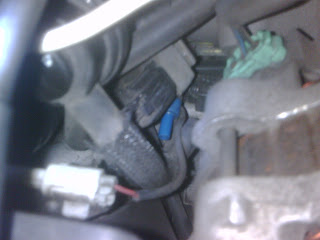

The little hose down and to the right of the blue nozzle is supposed to be connected. I must have yanked it off while changing the intake.

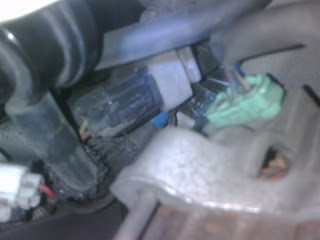
The picture below is what it's supposed to look like when the hose is hooked up properly. If you snapped the connector (I didn't) you'll need to buy a new part.

Cheers!

Tuesday, 3 February 2009

Getting Rid of The Bonjour Service

I hate it when applications I do want install things I don't want. A great example of this is the Bonjour Service that Apple and Adobe deploy.

Here's how to get rid of it:

1. Stop the service via either sc, net, or services.msc

2. Delete service:
sc delete "Bonjour Service"

3. Remove the socket driver:
HKEY_LOCAL_MACHINE\SYSTEM\CurrentControlSet\Services\WinSock2\Parameters\NameSpace_Catalog5\Catalog_Entries\00000000000X
Note: X is a number (usually 4) but be sure that the value for LibraryPath shows a path to "mdnsNSP.dll"

4. Change the value Endabled from 1 to 0

5. Reboot

Au'revoir Bonjour!!

Monday, 26 January 2009

Changing the default backup directory for SQL 2005

I got tired of using regedit to do this (the value is in HKLM\SOFTWARE\Microsoft\Microsoft SQL Server\{your instance}\MSSQLServer\BackupDirectory) and write a quick script to do it. I found it really tedious to change this on so many servers and clusters. It'll work with all versions of SQL 2005 and Express AFAIK.

I've posted it for anyone else interested, and be aware that it does use the "undocumented" xp_instance_regread and xp_instance_regwrite extended stored procedures.


DECLARE @SmoDefaultFile nvarchar(512), @NewBackupDir nvarchar(250);
SET @NewBackupDir = N'\\dbs51ykf\SQL_Backups'; --THE NEW BACKUP DIRECTORY TO USE

--LIST THE CURRENT DIRECTORY
EXEC master.dbo.xp_instance_regread
N'HKEY_LOCAL_MACHINE',
N'Software\Microsoft\MSSQLServer\MSSQLServer',
N'BackupDirectory',
@SmoDefaultFile OUTPUT;

SELECT @SmoDefaultFile as [Old Backup Directory];

--CHANGE THE DIRECTORY
EXEC xp_instance_regwrite
N'HKEY_LOCAL_MACHINE',
N'Software\Microsoft\MSSQLServer\MSSQLServer',
N'BackupDirectory',
REG_SZ,
@NewBackupDir;

--CONFIRM CHANGE
EXEC master.dbo.xp_instance_regread
N'HKEY_LOCAL_MACHINE',
N'Software\Microsoft\MSSQLServer\MSSQLServer',
N'BackupDirectory',
@SmoDefaultFile OUTPUT;

SELECT @SmoDefaultFile as [New Backup Directory];